How To Convert MP4 To MP3 on Windows
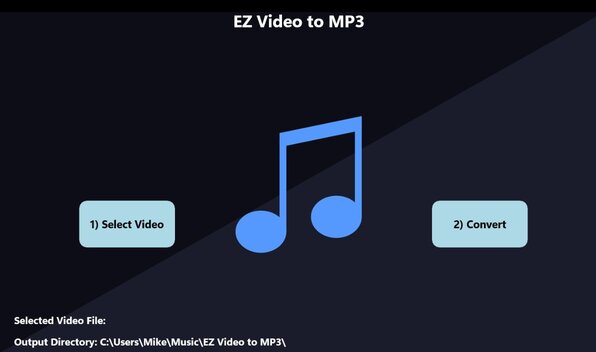

Converting videos to audio can be fast and simple by using a free app called EZ Video To MP3. The app has a sleek and friendly user interface to effortlessly convert video files into MP3 format. With just two clicks, users can transfer their favorite videos into audio mp3 files, preserving the sound quality without the visual content. This app is perfect for those who want to extract music, podcasts, or any audio content from videos.
This app comes with a simple user interface that consists of two main buttons. The first button allows users to select the video they wish to convert, while the second button initiates the conversion process. This app is an essential tool for anyone looking to quickly convert videos into audio content.
Tutorial
Follow these simple steps to convert your video files or MP4 into MP3 format using EZ Video To MP3:
- Install the App: Click here to download and install the app from the Microsoft Windows App Store.
- Open the App: Click on the EZ Video To MP3 icon to launch the application.
-
Select a Video File:
- Click on the button labeled "Select Video."
- Navigate to the location of the video file you want to convert.
- Click on the video file to select it.
- The label at the bottom of the app screen will show the selected file.
-
Convert the Video File:
- Click on the button labeled "Convert."
- The status of the conversion process will be displayed on the top left of the app screen. Wait for the conversion to complete.
- A success message and an open button will be displayed once the conversion is finished.
-
Access Your MP3 File:
- The newly converted MP3 file will be saved in your default music folder.
- Click the open button to open the folder where your converted file is located. Click on your mp3 file to play it.
Conclusion
EZ Video To MP3 supports many video formats and makes converting video to MP3 a breeze with its straightforward two-button interface. Users of all technical levels can easily use this program. Enjoy your newly converted audio!